Flutter レイアウト
Flutterでレイアウトのサンプルを作ってみます。開発環境
import 'package:flutter/material.dart';

void main() {
  runApp(const MyApp());
}

class MyApp extends StatelessWidget {
  const MyApp({super.key});

  @override
  Widget build(BuildContext context) {
    return MaterialApp(
      home: Scaffold(
        appBar: AppBar(title: Text("title")),
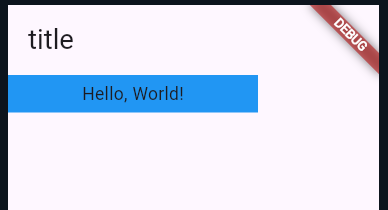
        body: Container(
          width: 200,
          height: 30,
          color: Colors.blue,
          alignment: Alignment.center,
          child: Text('Hello, World!'),
        ),
      ),
    );
  }
}
実行結果
import 'package:flutter/material.dart';

void main() {
  runApp(const MyApp());
}

class MyApp extends StatelessWidget {
  const MyApp({super.key});

  @override
  Widget build(BuildContext context) {
    return MaterialApp(
      home: Scaffold(
        appBar: AppBar(title: Text("title")),
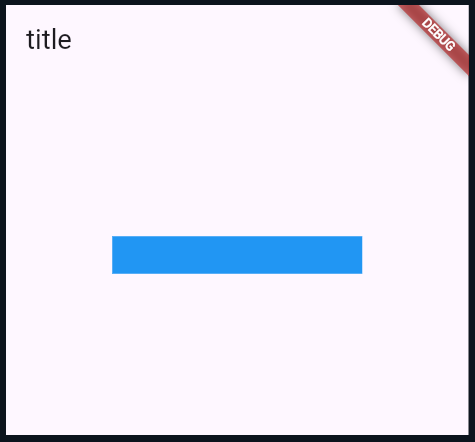
        body: Center(
          child: Container(width: 200, height: 30, color: Colors.blue),
        ),
      ),
    );
  }
}
実行結果
import 'package:flutter/material.dart';

void main() {
  runApp(const MyApp());
}

class MyApp extends StatelessWidget {
  const MyApp({super.key});

  @override
  Widget build(BuildContext context) {
    return MaterialApp(
      home: Scaffold(
        appBar: AppBar(title: Text("title")),
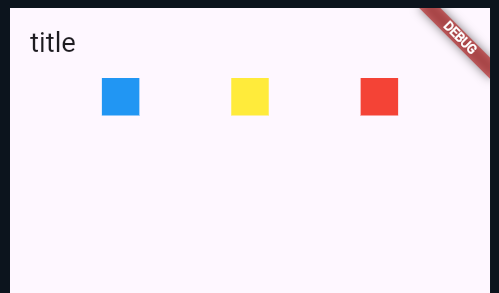
        body: Row(
          mainAxisAlignment: MainAxisAlignment.spaceEvenly,
          children: [
            Container(width: 30, height: 30, color: Colors.blue),
            Container(width: 30, height: 30, color: Colors.yellow),
            Container(width: 30, height: 30, color: Colors.red),
          ],
        ),
      ),
    );
  }
}
実行結果
import 'package:flutter/material.dart';

void main() {
  runApp(const MyApp());
}

class MyApp extends StatelessWidget {
  const MyApp({super.key});

  @override
  Widget build(BuildContext context) {
    return MaterialApp(
      home: Scaffold(
        appBar: AppBar(title: Text("title")),
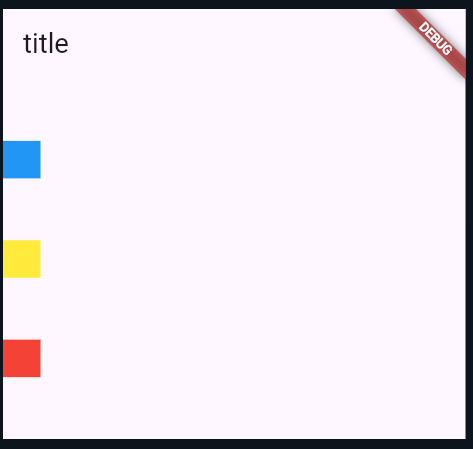
        body: Column(
          mainAxisAlignment: MainAxisAlignment.spaceEvenly,
          children: [
            Container(width: 30, height: 30, color: Colors.blue),
            Container(width: 30, height: 30, color: Colors.yellow),
            Container(width: 30, height: 30, color: Colors.red),
          ],
        ),
      ),
    );
  }
}
実行結果
ページのトップへ戻る